
Local SEO Pages: A Practical Guide to Reaching Nearby Customers
Local SEO Pages: How to Create Pages That Help Nearby Customers Find Your Business
Local SEO pages are website pages designed to help a business appear in search results for services in specific places. A well-made page can answer local customers’ questions, explain what a business offers in their area, and make it easy to take the next step—such as calling, booking, or requesting a quote.
Simply creating a page for every city or neighborhood is not enough. Useful local pages provide accurate, relevant information for each place they cover. Pages that only swap out a city name while repeating the same content can frustrate visitors and may be treated as low-quality or doorway pages by search engines.
When to Create a Local SEO Page
Create a local page when your business genuinely serves a particular area and can provide useful information about serving customers there. This may apply to a business with multiple locations, a service-area business, or a company that has distinct offerings in different markets.
For example, a plumbing company might have a page explaining its services in a city where it regularly works. A restaurant with several locations might create a separate page for each restaurant, including its address, hours, menu, and location-specific details.
A dedicated page may not be necessary for every nearby town. If there is no meaningful difference in your service, availability, or local information, a single service-area page may be more helpful than many nearly identical pages.
What to Include on a Local SEO Page
A strong local page is written for people first. Include details that help a potential customer understand what you offer and whether you serve them.
- A clear page title and heading: Describe the service and location naturally, such as “Roof Repair in Madison, WI.”
- Specific service information: Explain what you do, who the service is for, and what customers can expect.
- Accurate location or service-area details: Provide an address for a staffed location, or clearly explain the areas you serve if you travel to customers.
- Local, useful content: Include details that genuinely apply to the area, such as local scheduling information, service limitations, or relevant project examples.
- Trust signals: Add authentic testimonials, credentials, photographs, or case studies when available and appropriate.
- A clear call to action: Make it easy to call, book an appointment, request a quote, or contact your team.
- Helpful internal links: Link to related services, contact information, and other relevant pages on your site.
Make Each Page Genuinely Distinct
Local pages should not be copies with only the city name changed. Write content that reflects the actual way your business serves each location. You might explain which services are available there, how customers can schedule, or what a completed project involved. Only include claims, reviews, photos, and local references that are accurate and authorized.
If you have no meaningful information to add for a particular area, consider mentioning it on a broader service-area page instead of publishing a thin standalone page. A smaller number of thorough, useful pages is often better for visitors than a large collection of repetitive ones.
Use Local Keywords Naturally
Think about how customers describe the service and location when they search. A page can mention the service and city in its title, main heading, body copy, and page description where appropriate. Use natural language rather than repeating the same phrase over and over.
Related terms can also make the page clearer. For instance, a local electrician’s page might discuss panel upgrades, lighting installation, or emergency repairs—but only if those services are actually offered in that area.
Keep Business Information Accurate
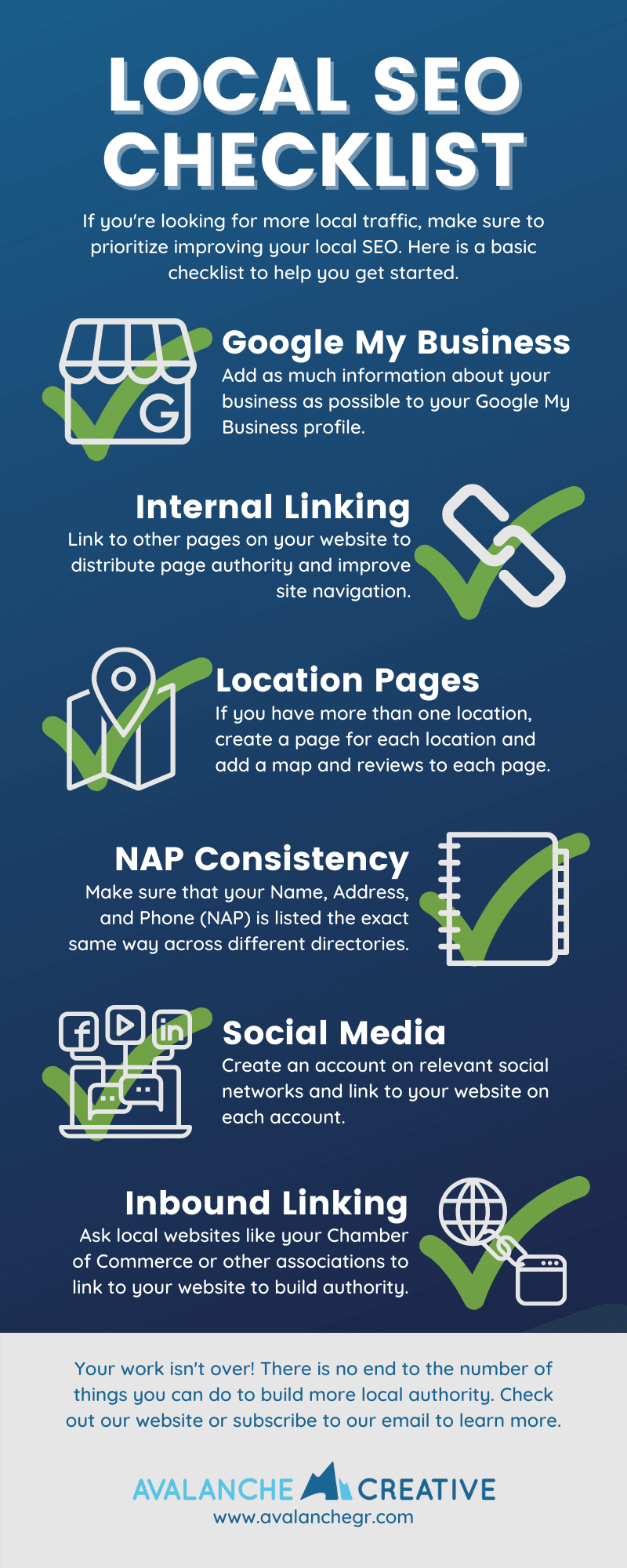
For a physical business location, make sure the page displays the correct business name, address, phone number, and hours. Keep those details consistent with your other online listings. For a service-area business that does not receive customers at its address, explain how the service works and avoid presenting a private or ineligible address as a storefront.
Your website location pages and your Google Business Profile serve related but different purposes. A local page provides detailed information on your website; a Business Profile helps customers find eligible businesses on Google. Keep both accurate, and follow the platform’s rules for addresses and service areas.
Technical and On-Page Basics
- Give each page a descriptive, unique title and meta description.
- Use a simple, readable URL, such as
/madison-wi/roof-repair/. - Make the page mobile-friendly and easy to navigate.
- Use descriptive image text when images convey useful information.
- Ensure the page loads properly and can be reached through clear site navigation or relevant internal links.
- Use structured data only when it accurately represents the page and business.
Common Local SEO Page Mistakes
- Publishing many pages with nearly identical text.
- Listing locations where the business does not actually operate.
- Adding unsupported claims, fabricated testimonials, or misleading addresses.
- Overusing city names and keywords in a way that makes the page awkward to read.
- Creating a page without a clear next step for the visitor.
- Leaving outdated phone numbers, hours, or service details online.
Measure and Improve Your Pages
Review local pages regularly to confirm that their information remains current. Use analytics and search performance tools to understand which pages attract visitors and whether those visitors take useful actions, such as calling or submitting a form. If a page receives little engagement, improve its clarity, usefulness, or visibility in your site navigation rather than adding more keywords.
Final Thoughts
Effective local SEO pages connect a specific service with a real community and provide practical information for people ready to choose a business. Focus on accuracy, distinct local value, and a straightforward customer experience. When a page genuinely helps local visitors, it has a stronger foundation for earning visibility and building trust.
Boost Your Business with Local SEO: 9 Key Benefits for Enhanced Visibility and Customer Engagement
- Help nearby customers find your business.
- Target searches tied to specific locations.
- Showcase services available in each area.
- Share useful local information.
- Build trust with accurate business details.
- Make it easier for customers to contact you.
- Strengthen your website’s local relevance.
- Highlight location-specific reviews and projects.
- Support better local search visibility.
Challenges of Local SEO Pages: Time, Quality, Rankings, Accuracy, and Navigation
- Creating unique pages for each location takes time.
- Thin or duplicate pages can hurt search visibility.
- Local rankings can take time to improve.
- Business details must be kept accurate and updated.
- Too many location pages can make site navigation cluttered.
Help nearby customers find your business.
Local SEO pages help nearby customers find your business when they search online for products or services in their area. By clearly connecting what you offer with the locations you serve, these pages can make your business more visible in relevant local search results and give potential customers useful details—such as available services, hours, and how to get in touch.
Target searches tied to specific locations.
Local SEO pages help your business reach people searching for a service in a specific city, neighborhood, or region. By clearly connecting your offerings with the locations you serve, each page can give search engines relevant context and help nearby customers find useful information—such as available services, service-area details, and how to get in touch. This makes your website more relevant to location-based searches and helps connect your business with potential customers in the right area.
Showcase services available in each area.
Local SEO pages let businesses highlight the specific services available in each area they serve. By explaining what customers can book or request locally, businesses can set clear expectations, answer location-specific questions, and help nearby visitors find the services that best fit their needs. This also makes each page more useful than a generic location listing.
Share useful local information.
Local SEO pages give businesses a place to share information that matters to people in a specific community. They can explain which neighborhoods are served, how local customers can book, what services are available nearby, and include relevant examples or practical details. This helps visitors quickly decide whether the business fits their needs while making the page more useful than one that simply repeats a service and city name.
Build trust with accurate business details.
Local SEO pages help build trust when they provide accurate, up-to-date business details, such as your address, phone number, hours, and the areas you serve. Consistent information reassures potential customers that your business is legitimate and makes it easier for them to contact or visit you. When people can quickly confirm the details they need, they’re more likely to feel confident choosing your business.
Make it easier for customers to contact you.
Local SEO pages make it easier for nearby customers to contact your business by putting essential details—such as your phone number, address or service area, business hours, and booking or quote-request options—right where visitors need them. Clear contact information and a prominent call to action help people take the next step quickly, whether they want to call, schedule an appointment, or ask a question.
Strengthen your website’s local relevance.
Local SEO pages strengthen your website’s local relevance by clearly connecting your services to the communities you serve. When each page includes accurate location details, locally useful information, and relevant services, both visitors and search engines can better understand where your business operates. This can help your site appear more relevant to people searching for your services nearby.
Highlight location-specific reviews and projects.
Local SEO pages give you a place to showcase reviews and completed projects that are relevant to customers in a particular area. Featuring authentic testimonials from nearby clients, along with photos or brief descriptions of local work, helps visitors see your experience in their community and understand the quality of your services. These location-specific examples can build trust and help potential customers feel more confident choosing your business.
Support better local search visibility.
Local SEO pages can support better visibility in search results by clearly connecting your services to the locations you serve. When a page provides useful, accurate information about a service and a specific area, it can help search engines understand its relevance to local searches and help nearby customers find the right information.
Creating unique pages for each location takes time.
Creating unique local SEO pages for every location takes time and effort. Each page needs accurate local details, useful content, and a clear explanation of the services available in that area—not just a city name swapped into a template. Researching, writing, reviewing, and updating multiple pages can become a significant workload, especially for businesses serving many locations.
Thin or duplicate pages can hurt search visibility.
Thin or duplicate local SEO pages can make it harder for search engines to understand which pages are genuinely useful to searchers. If multiple pages offer little original information or differ only by city name, they may be seen as low-value and struggle to rank. Instead of creating a page for every nearby area, focus on publishing fewer, more helpful pages with accurate details and content that reflects how your business serves each location.
Local rankings can take time to improve.
One drawback of local SEO pages is that improved rankings can take time. Search engines need to discover and evaluate new or updated pages, and visibility may depend on factors such as competition, your website’s authority, and the accuracy of your business information. Even well-written pages may not produce immediate results, so businesses should treat local SEO as an ongoing effort, monitor performance, and update pages as needed.
Business details must be kept accurate and updated.
One challenge of local SEO pages is keeping business details accurate and up to date. Changes to phone numbers, hours, addresses, service areas, or available services need to be reflected across every relevant page and online listing. If information becomes outdated or inconsistent, customers may have trouble reaching the business or arrive at the wrong location, which can damage trust and lead to missed opportunities.
Too many location pages can make site navigation cluttered.
Creating too many location pages can clutter your website’s navigation, making it harder for visitors to find the information they need. A long list of cities may overwhelm users, especially on mobile devices, and distract from important pages like services and contact information. Organize locations into clear regional sections, and feature only the most useful pages in your main navigation.