
How to Improve Your Local Google Ranking and Attract More Nearby Customers
How to Improve Your Local Google Ranking
When people search Google for a nearby service or business, they often see a map and a set of local business listings near the top of the results. Appearing prominently in these local results can help customers discover your business, learn about your services, and get in touch. While no one can guarantee a specific position, you can take practical steps to improve your visibility in local Google searches.
What Affects Local Google Rankings?
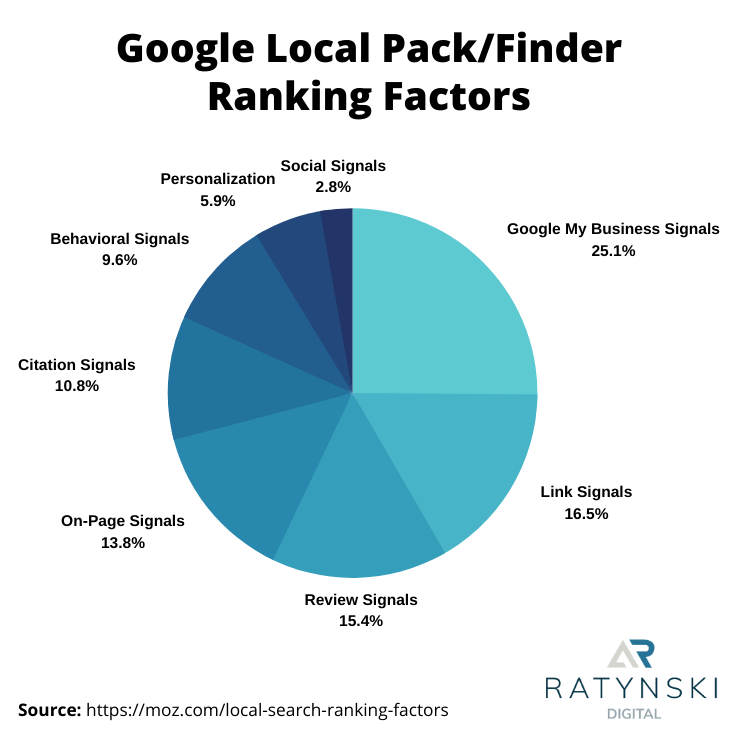
Google says local results are primarily based on three factors: relevance, distance, and prominence.
- Relevance: How well your business profile and website match what someone is searching for.
- Distance: How far your business is from the person searching or the location included in the search.
- Prominence: How well-known and established your business appears to be, based on information such as links, reviews, and other online references.
Distance is not something a business can directly control. The most useful approach is to provide accurate information, clearly describe what you offer, and build a strong, trustworthy presence online.
Claim and Complete Your Google Business Profile
Your Google Business Profile is a key source of information for local searchers. Claim or verify the profile, then complete every relevant section. Use your real-world business name, choose the most accurate primary category, and add appropriate secondary categories.
Keep your address, phone number, website, hours, and service details current. Add a concise description of your business and upload clear, genuine photos that show your location, team, products, or work. If your hours change for holidays or special events, update them so customers are not relying on outdated information.
Only create a profile when your business is eligible under Google’s guidelines. Do not use a virtual office or an address where your business is not staffed as though it were a customer-facing location.
Make Your Website Useful for Local Customers
Your website should make it easy for people and search engines to understand what your business does and where it operates. Include your business name, contact details, services, and service areas where appropriate. Make sure this information agrees with your Google Business Profile.
Create helpful pages for your actual services and locations. For example, a plumbing company might have separate pages explaining its drain repair and water heater services, along with clear information about the communities it serves. Each page should offer useful, original information—not just a list of place names added to attract search traffic.
Also make sure your site works well on mobile devices, loads reliably, uses secure HTTPS, and provides straightforward ways to call, book, or request a quote.
Keep Business Information Consistent
Check that your business name, address, and phone number are accurate wherever they appear online, including your website, social media profiles, and reputable business directories. Correct outdated listings when you find them. Consistency helps customers and search engines identify the right business, though it does not guarantee a ranking improvement.
Earn Reviews and Respond Thoughtfully
Reviews can help potential customers decide whether to choose your business. Invite customers to leave honest feedback after a genuine interaction, and make the process simple. Do not buy reviews, offer incentives in exchange for positive reviews, or pressure customers to change their feedback.
Respond professionally to reviews when possible. Thank customers for positive comments, and address concerns calmly without sharing private information. A thoughtful response shows that your business pays attention to customer experiences.
Build Local Prominence Naturally
Prominence grows through a credible presence both online and in the community. Earn relevant links and mentions by contributing useful expertise, partnering with local organizations, sponsoring community activities, or sharing information that local publications may find valuable. Focus on real relationships and useful contributions rather than buying links or submitting your site to low-quality directories.
Use Business Profile Features
Depending on your business category and location, your profile may support features such as services, products, appointment links, posts, or messaging. Use the features that are available and relevant. Keep them accurate, and check periodically for suggested edits or changes to your profile.
Measure Results Over Time
Use Google Business Profile performance data and website analytics to understand how people find and interact with your business. Look at trends in calls, website visits, direction requests, and search queries. You can also check how your business appears for searches from different locations, since local results can vary depending on where the searcher is.
Change one or two things at a time and allow enough time to observe the results. Local visibility can shift as competitors update their profiles, customer behavior changes, and Google adjusts its systems.
A Practical Local Ranking Checklist
- Verify that your business is eligible for a Google Business Profile.
- Complete and regularly update your profile.
- Use accurate business categories, contact details, and hours.
- Publish useful website content about your services and genuine service areas.
- Keep important business information consistent online.
- Ask for honest reviews without incentives or pressure.
- Respond to customer feedback professionally.
- Earn local links and mentions through legitimate community involvement.
- Track performance and make improvements based on real data.
Final Thoughts
Improving your local Google ranking is an ongoing effort, not a one-time trick. Accurate business information, a complete profile, a helpful website, genuine customer reviews, and a strong local reputation can all support better visibility. Focus on serving customers well and giving them clear, trustworthy information; sustainable local search performance follows from that foundation.
Top 8 FAQs About Boosting Your Local Google Ranking
- What is local Google ranking?
- How does Google determine local search rankings?
- How can I improve my local Google ranking?
- How long does it take to rank higher in local Google search results?
- Does a Google Business Profile affect local rankings?
- Do customer reviews help improve local Google rankings?
- Why does my business rank differently in different locations?
- How can I track my local Google rankings?
What is local Google ranking?
Local Google ranking is the position your business appears in Google Search and Google Maps when people search for nearby products or services. Google determines local results based mainly on relevance, distance, and prominence—how closely your business matches the search, how near it is to the searcher or requested location, and how established it appears online. A strong local presence can help nearby customers find your business, though rankings may vary by searcher location and query.
How does Google determine local search rankings?
Google determines local search rankings based mainly on relevance, distance, and prominence. Relevance measures how well your business profile and website match the search; distance considers how close your business is to the searcher or the location they specified; and prominence reflects how established and well-known your business appears, using signals such as reviews, links, and information from across the web. You can’t control every factor—especially a searcher’s location—but keeping your business information accurate and complete, earning genuine customer reviews, and maintaining a helpful website can support your local visibility.
How can I improve my local Google ranking?
To improve your local Google ranking, claim and complete your Google Business Profile with accurate business details, the right categories, current hours, and clear photos. Make sure your website explains your services and the areas you genuinely serve, and keep your business name, address, and phone number consistent across trusted online listings. Encourage customers to leave honest reviews and respond to feedback professionally. Helpful local content and genuine links or mentions from community organizations can also strengthen your online presence. Local results depend on factors such as relevance, distance, and prominence, so rankings may vary by searcher location and cannot be guaranteed.
How long does it take to rank higher in local Google search results?
There’s no fixed timeline for ranking higher in local Google search results. Some updates, such as correcting your business hours or completing your Google Business Profile, may appear relatively quickly, while stronger visibility can take weeks or months as Google gathers information and your business builds a track record of relevance and prominence. Results also depend on factors such as competition, searcher location, reviews, website quality, and the accuracy of your business information. Focus on consistent, helpful improvements, and monitor your visibility over time rather than expecting an overnight change.
Does a Google Business Profile affect local rankings?
Yes. A complete, accurate, and verified Google Business Profile can help Google understand your business and how relevant it is to local searches. Keeping your business category, contact information, hours, services, and location details up to date may support local visibility, while photos and genuine customer reviews can help people make informed decisions. A profile does not guarantee a particular ranking, and local results also depend on factors such as the searcher’s location and your business’s prominence.
Do customer reviews help improve local Google rankings?
Customer reviews can help support your local Google visibility. Google says that review count and positive ratings may contribute to prominence, one of the factors used to rank local results. Reviews also help potential customers evaluate your business and can encourage more visits, calls, or inquiries. Ask customers for honest feedback, never buy reviews or offer incentives for positive ones, and respond professionally to both praise and concerns. Reviews are one factor among several, so they cannot guarantee a higher ranking.
Why does my business rank differently in different locations?
Your business may rank differently in different locations because Google considers the searcher’s location when showing local results. Businesses closer to the person searching may appear more prominently, and rankings can also vary based on the search phrase, competition, and how relevant or prominent Google considers each business to be. As a result, your listing may show up near the top in one neighborhood but lower—or not at all—in another. Check performance across multiple areas, and focus on accurate business information, a complete Google Business Profile, helpful local website content, and genuine customer reviews rather than expecting one ranking to represent every location.
How can I track my local Google rankings?
You can track local Google rankings by monitoring your visibility for relevant searches in the areas you serve. Check your Google Business Profile performance and Google Search Console for trends in searches, clicks, calls, and website visits. For more location-specific comparisons, use a reputable local rank-tracking tool that checks results from different neighborhoods or ZIP codes. Search results can vary by location, device, and personalization, so avoid relying on a single manual search or one ranking number. Track a consistent set of keywords over time, and focus on whether visibility is bringing useful actions—such as calls, direction requests, and qualified website visits.