
How to Create a Google Ads YouTube Video Campaign
A Google Ads YouTube video campaign can help your business reach potential customers while they watch videos, browse YouTube, or explore content across Google’s video inventory. Whether your goal is to build brand awareness, attract website visitors, or encourage people to take action, a well-planned campaign can put your message in front of the right audience.
This guide explains how YouTube video campaigns work, how to set one up, and what to monitor as you improve performance.
What Is a YouTube Video Campaign?
A YouTube video campaign is an advertising campaign created in Google Ads that uses video creative to reach viewers. Depending on the campaign objective and settings available in your account, ads may appear in places such as:
- In-stream placements: Ads shown before, during, or after other videos. Some formats can be skipped after a few seconds.
- In-feed placements: Video ads presented alongside YouTube content, such as in search results or recommendations.
- YouTube Shorts: Eligible video ads may appear in the Shorts viewing experience.
Available formats, placements, and bidding options can change over time and may depend on your campaign goal, region, and account settings.
Choose a Clear Campaign Goal
Before creating your campaign, decide what you want viewers to do. A clear goal helps guide your campaign type, creative, targeting, and measurement.
- Awareness: Introduce your brand, product, or service to a relevant audience.
- Consideration: Encourage people to learn more, watch additional content, or visit your website.
- Leads or sales: Prompt interested viewers to complete an action, such as submitting a form or making a purchase.
Google Ads may recommend campaign types and settings based on the objective you select. Review those recommendations and choose the options that best fit your business. For action-focused campaigns, Google Ads may offer formats or campaign types designed to drive conversions across Google’s inventory.
How to Set Up a YouTube Video Campaign
-
Link your YouTube channel.
Connect your YouTube channel to Google Ads when appropriate. Linking can help you access channel-related features and use audience data where eligible. Make sure you have permission to connect the accounts.
-
Create a new campaign.
In Google Ads, select the option to create a new campaign and choose a goal that matches your desired outcome. The available campaign options may vary.
-
Select your campaign settings.
Set your campaign name, budget, bidding approach, locations, languages, and schedule. Start with a budget you can sustain long enough to collect useful performance data.
-
Define your audience.
Depending on the campaign type, you may be able to reach people using audience segments, demographics, interests, search or browsing signals, or your own eligible customer and website data. Keep targeting relevant without making it unnecessarily narrow.
-
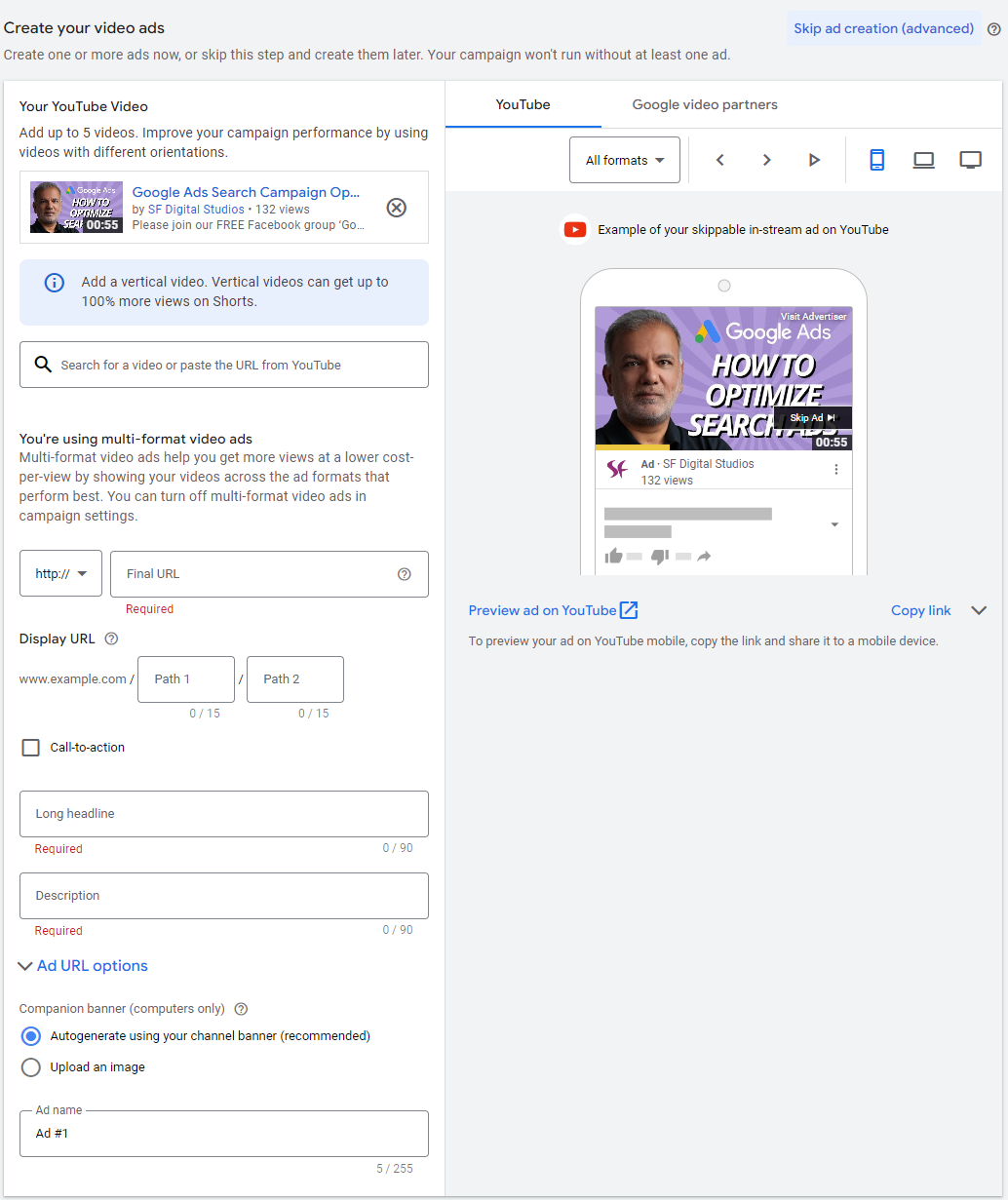
Add your video creative.
Select a video hosted on YouTube or upload one as directed in Google Ads. Add the required destination URL and any available companion assets, calls to action, or headlines.
-
Review and publish.
Check the campaign settings, landing page, ad text, and tracking before launch. Confirm that the destination page works well on mobile and clearly matches the promise made in the video.
Create Video Ads That Hold Attention
Viewers often decide quickly whether to keep watching. Make the opening seconds useful and engaging rather than beginning with a long introduction.
- Lead with the main idea. Show the product, problem, benefit, or story early.
- Make the message easy to understand. Use clear language and focus on one primary point.
- Design for mobile viewing. Use readable text, strong visuals, and framing that works on smaller screens.
- Include a clear call to action. Tell viewers what to do next, such as learn more, compare options, or shop now.
- Use captions when suitable. Captions can make the message easier to follow when people watch without sound.
- Test different versions. Try variations in the opening, length, format, or call to action to learn what resonates with your audience.
Targeting and Budget Tips
Effective targeting balances relevance with enough audience reach for the campaign to learn. Consider starting with a few well-defined audience groups rather than combining many unrelated segments into one campaign. If you use remarketing, follow Google’s policies and applicable privacy requirements.
Choose a budget and bidding strategy that align with your goal. Awareness campaigns may focus on reaching viewers efficiently, while conversion-focused campaigns may prioritize actions. Avoid making frequent changes during the initial learning period unless there is a clear issue, because substantial edits can affect delivery and make results harder to interpret.
Measure Campaign Performance
The right metrics depend on your objective. For an awareness campaign, review measures such as reach, impressions, views, view rate, and cost. For a traffic or conversion campaign, examine clicks, website sessions, leads, sales, and cost per conversion.
Set up conversion tracking before launch if you want to measure actions on your website. Check that the tracking tag or connected analytics setup is working, and use consistent attribution and reporting settings when comparing campaign results. A high view count alone does not necessarily mean the campaign is generating business value.
Common Mistakes to Avoid
- Launching without a specific campaign goal.
- Using a video that takes too long to explain its main benefit.
- Sending viewers to a slow, confusing, or unrelated landing page.
- Making the audience so narrow that the campaign struggles to deliver.
- Judging performance using only views or clicks instead of the outcome that matters.
- Changing many settings at once, making it difficult to identify what affected results.
Final Thoughts
A successful Google Ads YouTube video campaign combines a clear objective, compelling creative, thoughtful targeting, and reliable measurement. Start with a focused test, give it time to gather meaningful data, and use the results to refine your videos and settings. Since Google Ads features and formats can change, check the current options in your account and Google Ads Help Center when building your campaign.